Key Takeaways
- Effective voiceover starts with a defined audience, goal, and core message.
- Scripts need to sound natural aloud, with room for pauses, emphasis, and breathing.
- E-learning, podcasts, and explainer videos require different pacing and delivery styles.
- Recording preparation and a structured review process can prevent avoidable revisions.
- Clear direction, accurate pronunciation, and accessible supporting content help audiences follow along.
Voiceover is more than a finished audio file. It is a practical tool for guiding attention, explaining ideas, and helping people move through content without confusion. A well-planned professional voiceover can make a lesson feel more approachable, a podcast more compelling, or a product demonstration easier to understand.
The best results usually begin before anyone enters a recording booth. When the script, visuals, timing, and delivery notes are aligned early, the voice supports the message instead of competing with it.
Why Voiceover Planning Matters
Unclear narration creates unnecessary work for the audience. A software tutorial that rushes through a new dashboard, for example, can leave first-time users pausing, replaying, or abandoning the lesson. Planning helps teams identify the key actions, the order of information, and the moments where listeners need time to absorb what they heard.
It also reduces production friction. Finalizing the script before recording, agreeing on file requirements, and providing clear directions can prevent repeat sessions caused by avoidable changes.
Start With the Audience
Write for a specific listener, not a vague general public. Consider the audience’s knowledge level, location, language familiarity, accessibility needs, and reason for listening. A new employee completing compliance training needs calm, direct guidance. A customer watching a product introduction may respond better to a warmer, more energetic delivery.
Create a short audience profile before scripting. Include what listeners already know, what they need to do after hearing the content, and which terms may require a plain-language explanation. This step also helps teams decide whether regional vocabulary, an accent preference, or pronunciation notes are appropriate.
Build a Script for the Spoken Word
Writing that looks polished on a page can still sound stiff when read aloud. Favor short sentences, familiar words, and one idea at a time. Read every draft aloud at a natural pace. If a sentence requires a breathless delivery or repeated self-correction, rewrite it.
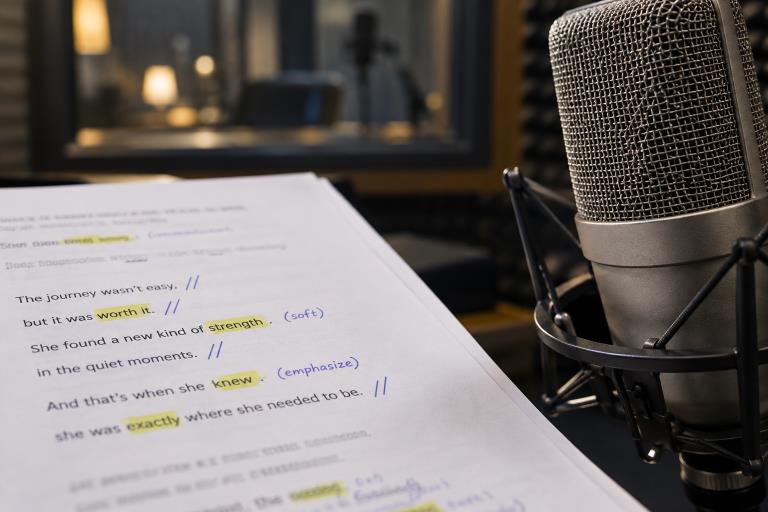
Use punctuation as performance guidance
Co.mmas, periods, and line breaks can signal pauses and help the narrator maintain a clear rhythm. Mark unfamiliar names, acronyms, numbers, technical language, and preferred pronunciations before recording begins.
Before: “Users are requested to subsequently navigate toward the account-management interface to update their existing preferences.”
After: “Next, open Account Settings. Then choose the preferences you want to change.”
Match the Tone to the Format
Every project needs an intentional vocal approach. Conversational delivery suits many podcasts and customer-facing videos. Instructional delivery works best when accuracy and steady pacing matter. Commercial reads may need more energy, while documentary narration often benefits from a measured, curious tone.
Give specific direction rather than asking for the voice to sound “better.” Useful notes include “warm and reassuring,” “confident but not forceful,” or “leave a short pause after each step.” A short reference clip can also clarify expectations, as long as it guides style rather than encourages imitation.
Make E-Learning Easier to Follow
E-learning narration should leave learners enough time to process an instruction before introducing the next one. Use brief pauses after important points, especially before a new step, a safety reminder, or a knowledge check. Keep narration coordinated with on-screen text, demonstrations, and diagrams so the learner is not asked to read one idea while hearing an unrelated one.
Record lessons in short, labeled sections instead of one long file. This makes updates simpler and gives editors more flexibility. Current discussion of educational voiceover also reflects the continuing importance of clarity, pacing, and accessibility in digital learning content.
Create Better Podcast Narration
Podcast production may combine host conversation, scripted narration, interviews, introductions, and advertising reads. Each part should feel distinct while maintaining consistent volume and overall tone. Hosts can sound informal and spontaneous, but scripted passages still need careful editing to avoid interrupting the natural flow of the episode.
Plan for both listening and viewing when appropriate. Recent research on the shift from listening to watching podcasts highlights why producers may want clean visual moments, concise clips, and narration that works across audio and video formats.
Use Voiceover in Explainer Videos
An explainer video works best when narration guides the viewer through the essential story without describing every visible detail. Structure the script around four points: the problem, the process, the proof, and the next step. Use plain language, concrete examples, and comparisons that make a technical process easier to picture.
Time the script against the animation, screen recording, or product demonstration. If a visual needs several seconds to register, the narration should not race ahead.
Plan the Recording Session
Before recording, confirm the final script version, deadline, file type, voice direction, pronunciation notes, and revision process. Record multiple takes of especially important lines, including opening statements, calls to action, and wording that must match a visual precisely. Consistent microphone placement, room sound, and delivery help separate takes that blend smoothly during editing.
Review Audio Before Publishing
Review both the technical result and the listener experience. Check for background noise, clipped words, distracting breaths, clicks, inconsistent volume, and timing problems. Confirm that names, figures, links, captions, and calls to action are accurate. If possible, ask someone unfamiliar with the project to identify confusing sections before publication.
Common Mistakes and a Simple Production Checklist
- Avoid long sentences that are difficult to say in one breath.
- Do not use one pace or intensity for every section.
- Keep music and sound effects below important spoken information.
- Approve the script before recording and document later changes.
- Test the finished audio on everyday devices, including phones and laptops.
Clear voiceover comes from thoughtful choices made at every stage. Define the audience, write for the ear, choose a delivery style that fits the format, and review the final result with fresh attention. Those habits help e-learning, podcasts, and explainer videos deliver information people can follow and remember.