Waterproof restaurant menus can seem like a straightforward purchase until the questions start. Are they simply laminated paper? Will they suit a dining room with warm lighting? Does a higher price per copy mean a higher menu budget?
Those questions deserve more than a promise of durability. Restaurant owners need to compare materials, presentation, and replacement patterns against what actually happens during service. Five common misconceptions can make that comparison harder than it needs to be.
Myth 1: Waterproof always means laminated
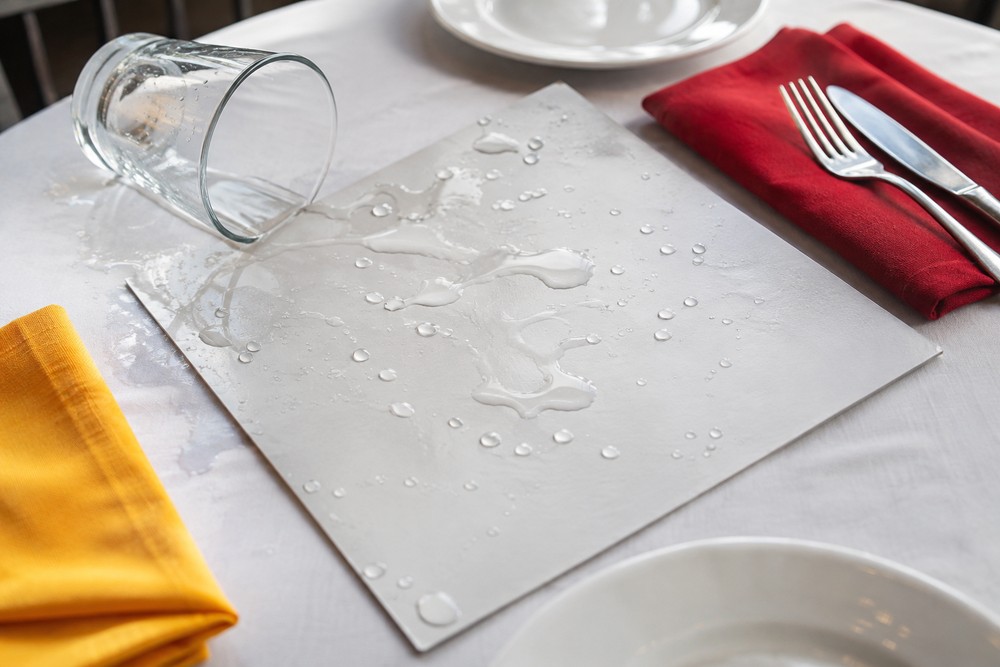
Laminated paper and menus printed on waterproof synthetic stock are different constructions. Lamination adds a protective film to a paper sheet. Synthetic menu printing uses a water-resistant substrate rather than relying on ordinary paper underneath an outer film.
The useful question is not just whether a finished menu repels a spilled drink. Ask what material the printer uses and how the finished print should be cleaned. A stock description alone does not explain how the complete menu, including its printed surface, will respond to the restaurant’s routine.
Request a sample and handle it as a server would. Stack several copies, slide one into the menu holder, and check how comfortably it bends in the hand. These small tests connect the material specification to the way menus move through the dining room.
Myth 2: Waterproof menus have to look shiny and plastic
Water resistance does not dictate the entire appearance of a menu. The stock, surface finish, artwork, and printing process all influence the result. Instead of choosing from a product photo alone, look at a printed sample under the lights where guests will read it.
Check whether reflections cross the item names or prices. If a matte option is available, compare it with the other finishes rather than assuming one will suit every room. Small type and dark backgrounds deserve particular attention because they may look different in a dim booth than beside a bright window.
Design still does much of the work. Clear section headings, restrained photography, and space between dishes help guests navigate the page. Waterproof stock does not require a crowded layout or oversized graphics. A simple wine list or compact lunch menu can use the same visual restraint as any other printed piece.
Myth 3: The unit price tells the whole cost story
A quote gives the price of an order, not the complete cost of keeping readable menus on tables. Replacement frequency matters, as does the reason copies leave circulation.
Separate physical wear from content changes. If menus are discarded because of spills or damaged edges, a different material may affect replacement spending. If they are discarded because prices change, the purchasing calculation needs to account for that schedule too.
Compare quotes for the same dimensions, quantity, and number of printed sides. Then estimate total spending over a period that fits the business, such as the time between planned menu updates. Include additional orders and any preparation or delivery charges shown in each quote.
For example, compare one planned order with the cost of that order plus an additional replacement batch. Use the restaurant’s actual records rather than assigning a promised lifespan to a material. That produces a useful purchasing comparison without pretending every dining room has the same workload.
Myth 4: Every waterproof printing option is interchangeable
Two products can share the word “waterproof” while differing in thickness, flexibility, finish, and print appearance. Choosing a printer means looking at those details together, not just comparing the largest durability claim on a page.
A specialist such as Menu Zaddy is one option to explore when sourcing waterproof restaurant menu printing. When comparing providers, ask about available materials, dimensions, artwork requirements, and the approval process. If samples or printed proofs are offered, establish what each includes before ordering.
Keep the questions connected to service. Will the finished size fit existing holders? Is the type readable at the table? Does the printer provide care instructions for the finished product? A clear answer to those questions is more useful than a technical term that nobody on the floor can translate into a purchasing decision.
Give each supplier the same brief so the resulting quotes describe comparable jobs.
Myth 5: QR codes have replaced the need for printed menus
A digital menu and a printed menu can serve different purposes at the same table. A QR code can point to frequently updated details, while a printed sheet lets guests browse dishes without using a phone.
There is no need to make those formats compete. A restaurant might keep its main food menu in print and use a digital page for rotating specials. Another might print drinks separately so the food selection remains easy to scan. The useful choice is the arrangement that supports the restaurant’s service style.
Keep the information consistent across formats. When a dish or price changes, update the digital page and the print master together. Durable menus still benefit from disciplined version control.
Let a sample guide the order
Before committing to a full run, gather the finished dimensions, artwork requirements, cleaning guidance, and delivery details in one place. Have someone from the floor review the sample alongside the person approving the design.
That practical review brings the decision back to the table: a readable menu, a suitable material, and an order quantity that matches the operation.